The Book of DL:Elysium
My current passion project. I have been participating, moderating and managing a collaborative writing (also known as roleplay, or RP) server on Discord for nearly two years.
Recently I set up a private Wiki site for members to use. For a little more than a month, I’ve spent most of my free time tweaking the site’s settings and permissions, editing its CSS, coding widgets, writing guides, and helping solve MediaWiki bugs along the way.
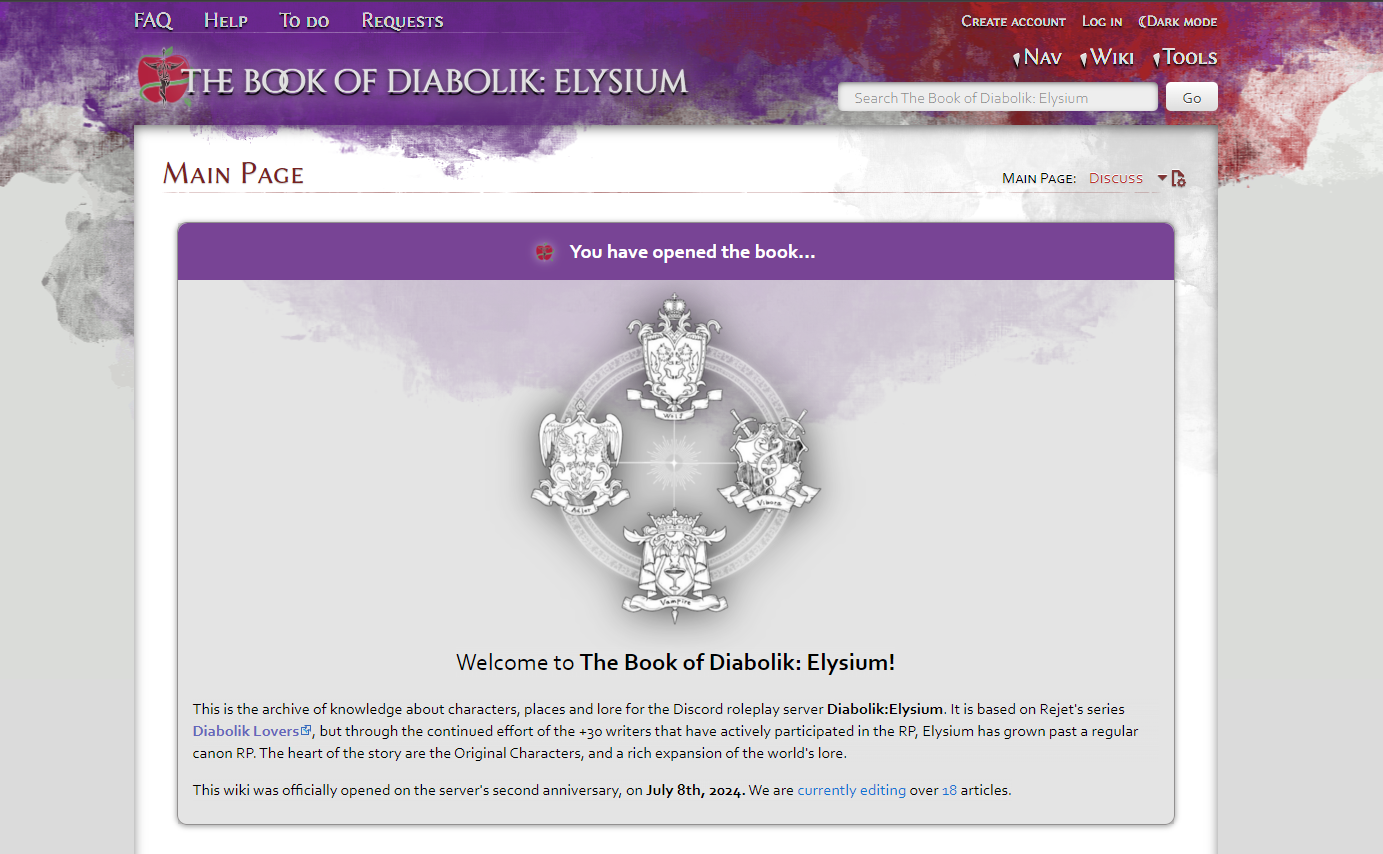
If you want to check it out…
Members of the server have decided to keep their writing private. However, I have permission to make its code and guides publicly readable.
- The Main page is public for all wikis.
- The topmost links in the header (FAQ, Help, To do, Requests)
- Nav > All Pages to see a list of all the pages of the wiki. This is used to access:
- Template pages, where widgets are coded
- Module pages, for Lua scripts
- MediaWiki pages, configuration files for the whole site
- Help pages, the namespace for user guides
The hosting site
The hosting I chose for the wiki is Miraheze. Fandom might be a more popular, user-friendly, and ready-to-use solution, but it lacked the main feature we needed: Private wikis. And being free, of course- Miraheze is entirely funded by donations.
It only applies a thin layer of tools over MediaWiki, the open-source software that most Wikis run on. Said tools are only a layer of control over settings (mostly security and permissions) and a handful of optional MediaWiki extensions. The rest is mostly barebones. Each Wiki’s admins have to build their own widgets, templates and themes.
Site theme and Common.css
The software relies on a basic HTML structure that we can’t touch, but gives us free reign over its CSS. Starting from one of MediaWiki’s approved available ‘skins’, admins can modify site-wide CSS through the MediaWiki:Common.css page.
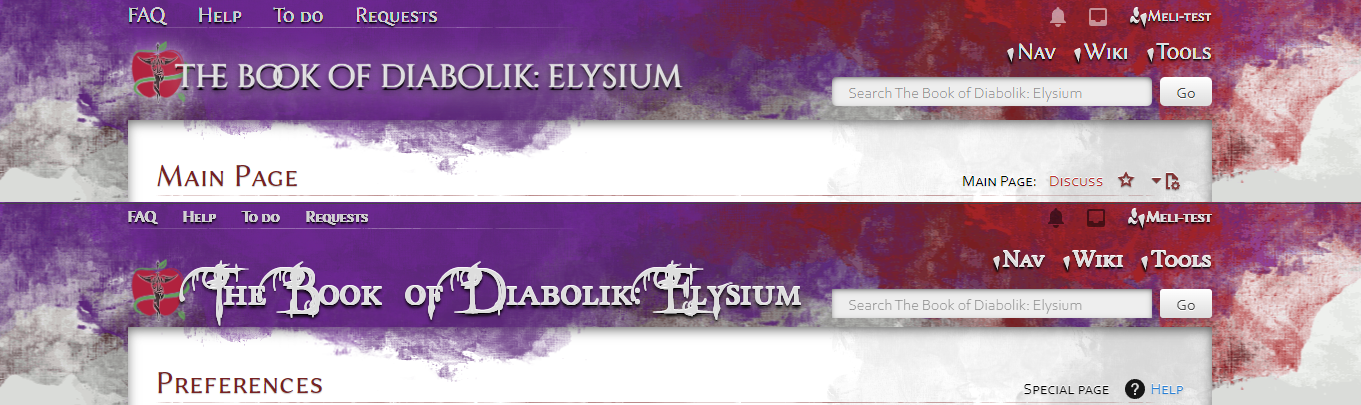
Even without being able to modify the source files directly, inspecting the site’s HTML structure gives us plenty of information to modify the looks of the page with Common.css
With things as simple as changing the main header…
#header #p-banner.mw-wiki-title {
	font-family: Cinzel Decorative, serif;
	font-size: 200%;
	text-transform: lowercase;
	font-weight: 500;
	margin-left: -20px;
    padding-left: 0 !important;
    z-index:9;
    position: relative;
    text-shadow:-1px 0 1px #fff, 0 0 1px #fff, 0 3px 1px #000, 0 3px 7px #000;
    filter:drop-shadow(0 0 15px #FFFFFFAA);
}

#header #p-banner:hover {
        text-shadow: -1px 0 2px #fff,0 -1px 1px #fff,0 3px 1px #000,0 3px 10px #fff, 3px 0 10px #fff;
    }

@media (max-width: 700px) {
    .mw-wiki-title {
		margin-left:0;
    }
…to removing elements for both aesthetics and usability
Click here to see the code, it's long~
/* Hide the namespaces in some titles*/
[class*="page-Category_"] .mw-page-title-namespace,
[class*="page-Category_"] .mw-page-title-separator,
[class*="page-Elysium_"] .mw-page-title-namespace,
[class*="page-Elysium_"] .mw-page-title-separator,
[class*="page-Help_"] .mw-page-title-namespace,
[class*="page-Help_"] .mw-page-title-separator {
	display: none;
}

/* Delete those mysterious <p> under the main title */
#contentSub > p {
	margin:0;
}

/* Apply flexbox layout to the h2 element to let us move the 'Edit source' */
.mw-body-content h1,
.mw-body-content h2,
.mw-body-content h3,
.mw-body-content h4,
.mw-body-content h5,
.mw-body-content h6 {
  display: flex;
  justify-content: space-between;
  align-items: center;
  position: relative; /* Ensure ::after is positioned correctly */
}

/* Use ::after pseudo-element to maintain the background image */
.mw-body-content h1::after, .mw-body-content h2::after {
  content: '';
  background-image: url(/1.41/skins/Splash/resources/images/hr.svg?30829);
  background-repeat: no-repeat;
  background-position: 0 100%;
  position: absolute;
  left: 0;
  bottom: 0;
  width: 100%;
  height: .125em; /* Adjust the height to match the image height */
}

/* Ensure mw-headline takes the remaining space */
.mw-body-content .mw-headline {
    text-align: left;
    flex-grow: 1;
}

/* Move 'Edit source' in article sections to the right */
.mw-body-content .mw-editsection {
  font-size: 12px;
  margin-left: auto;
  margin-right: -1em /* Pushes mw-editsection even more to the right */
}

/* Make the lower levels of headers have normal lowercase */
.mw-body-content h5 .mw-headline,
.mw-body-content h6 .mw-headline {
	font-variant-caps: normal;
}

/* Not letting people edit only tiny sections, because what for? Plus it looks ugly */
.mw-body-content h4 .mw-editsection,
.mw-body-content h5 .mw-editsection,
.mw-body-content h6 .mw-editsection {
	display: none;
}

/* Changing header links from color to underline */
.mw-body-content .mw-headline a {
	color: var(--header-color);
	text-decoration: underline var(--header-color);
}
Templates: MediaWiki’s widgets and more
The content of MediaWiki pages is usually written in wikitext, a markdown language. It shares a lot of similarities with Liquid, as it can parse (a sanitized subset of) HTML elements, call variables and functions, and transclude templates.
Most Wiki editors will use the latter to add content to their pages, as MediaWiki’s Visual Editor offers a user-friendly way of adding elaborate widgets with only a few clicks.
Templates are not premade, so wiki admins have to build them themselves. There are plenty of well-known Template types that most wikis use in one capacity or another- but given the particularities of each site, the majority have to be made manually.
See a list of all DL:E templates
Some can be as simple as notice banners…
If an editor inserts this in the wikitext of their page…
{{Template:Stub}}
It will generate this:

|
This article is a stub. You can help the wiki by expanding it! |
And hidden code to add the page to the Stubs category.
I am a real element! Inspect me or the Github code to see me.
Internally, this calls upon another template {{Template:MessageBox}} with its own settings. In turn, this template is
built with a wikitable filled with variables, and styled with Template:MessageBox/styles.css.
Template:Stub source code
{{MessageBox
    | type = content
    | image = [[File:Twemoji 1f4dd.svg|40px]]
    | text = This article is a '''stub.''' You can help the wiki by expanding it!
}}
{{#if:{{NAMESPACE}}||[[Category:Stubs]]}} Template:MessageBox source code
<templatestyles src="MessageBox/styles.css" />
{{{!}} style="{{{style|}}}" class="metadata plainlinks ambox {{#switch:{{{type|}}}
    | serious  = ambox-serious
    | content  = ambox-content
    | style    = ambox-style
    | move    = ambox-move
    | notice   = ambox-notice
    | locked = ambox-locked
    | #default = ambox-notice
}}"
{{!}}-
{{#ifeq:{{{image}}}|none
    | <!-- no image cell -->
    | <nowiki/>
{{!}} class="mbox-image" {{!}} {{#switch:{{{image|{{{type|}}}}}}
    | serious  = [[File:Octagon delete.svg|40px]]
    | content  = [[File:Ambox important.svg|40px]]
    | style    = [[File:Broom icon.svg|40px]]
    | move    = [[File:Ambox move.svg|40px]]
    | notice   = [[File:Info non-talk.svg|40px]]
    | locked = [[File:Ambox padlock gray.svg|40px]]
    | blank    = <!-- empty image cell -->
    | #default = {{{image|[[File:Info non-talk.svg|40px]]}}}
    }}
}}
{{!}} style="{{{textstyle|}}}" class="mbox-text" {{!}} {{{text}}}
{{#if:{{{imageright|}}}| <nowiki/>
{{!}} class="mbox-imageright" {{!}} {{#switch:{{{imageright|{{{type|}}}}}}
    | serious  = [[File:Octagon delete.svg|40px]]
    | content  = [[File:Ambox important.svg|40px]]
    | style    = [[File:Broom icon.svg|40px]]
    | move    = [[File:Ambox move.svg|40px]]
    | notice   = [[File:Info non-talk.svg|40px]]
    | locked = [[File:Ambox padlock gray.svg|40px]]
    | blank    = <!-- empty image cell -->
    | #default = {{{imageright|}}}
    }}
}}
{{!}}-
{{!}}}…Or as elaborate as information boxes
Infoboxes are a staple of all wikis: Tables that float on the right of the page and show a basic summary of the information of the article.
The infobox on the right is a real element! Inspect it or the Github code to see it.
{{EntityInfobox
| image = <gallery>
  Hissy icon.png
</gallery>
| type = Pet
| species = Hognose snake
| role = Guardian of the snake pit
| owner = [[Alrick Rosenfeld]]
[[Elise Rosenberg]]
| gender = Male
| age = 1 year and a half
| birthday = January 2024
| origin = Captive bred
| height = 23cm (9 in)
| favorite food = Frogs
| hobbies = Burrowing, sitting on warm rocks
| aka = Young Master <small>(by [[Lucien Deimos|Lucien]])</small>
}}
Using them requires a little bit more of how-to from Wiki editors. Since my users are young writers, not developers, I have built these templates making them as easy to use as possible without sacrificing features.
To achieve this, the extension TemplateData allows me to build an interactive form that editors can fill when using the View Editor; and renders a detailed table listing the fields in the documentation. With this I can fill the form with instructions, examples, and even predefined sets of options for editors to choose with a dropdown.
Template:LocationInfobox template data
<templatedata>
    {
    "description": "Side box for basic information about a location. Fields with [C] add the page to different
    categories!",
    "paramOrder": [
    "title",
    "image",
    "area",
    "subarea",
    "type",
    "owner"
    ],
    "format": "block",
    "params": {
    "title": {
    "label": "Title",
    "description": "Title of the infobox. Leave empty to match the page name",
    "type": "string"
    },
    "image": {
    "label": "Image",
    "description": "NOTE: You'll have to use 'insert image' separately to upload the file to the Wiki. If using more
    than one, use the example to insert the image with its label:",
    "example": "<gallery> ↵\n Example.jpg | Entrance ↵\n Example-2.jpg | At night ↵\n</gallery>",
    "type": "content",
    "suggested": true
    },
    "area": {
    "label": "[C] Area",
    "description": "Broad area where this location is situated in. DO NOT EDIT THESE OPTIONS. Kaminashi's outskirts
    still count as Kaminashi",
    "example": "Kaminashi",
    "type": "string",
    "suggestedvalues": [
    "[[Kaminashi]]",
    "[[Ryoutei Twilight University]]",
    "[[Makai]]",
    "Japan",
    "Human world"
    ],
    "required": true,
    "suggested": true
    },
    "subarea": {
    "label": "Subarea",
    "description": "Specific place within the area it's located in. The options in the drop-down are suggestions, you
    can type a new one too",
    "example": "Outskirts",
    "type": "string",
    "suggestedvalues": [
    "Outskirts",
    "Commercial district",
    "Residential district",
    "Red light district",
    "Ryoutei Twilight University campus",
    "Vampire kingdom"
    ],
    "suggested": true
    },
    "type": {
    "label": "[C] Type",
    "description": "Type of location. If it's a city, a residence, a shop...",
    "example": "University campus",
    "type": "string",
    "suggestedvalues": [
    "Residence",
    "Business",
    "University campus",
    "Public space",
    "Natural location",
    "City",
    "District",
    "Country"
    ],
    "required": true,
    "suggested": true
    },
    "owner": {
    "label": "Owner",
    "description": "If it's a residence or business, who owns or lives there. If a business owner is a nameless NPC,
    there's no need to fill this field. Use this notation to link to the character's page",
    "example": "[[Janitor]]",
    "type": "string",
    "suggested": true
    }
    }
    }
</templatedata>Also in the spirit of ease-of-use and minimizing user input, each Infobox comes with a hidden script that automatically
adds category tag to the page, depending on what editors filled the infobox with. if and switch statements are
bundled with
MediaWiki, but StringContains is a Lua module I added myself
here.
Template:CharacterInfobox category sorting
{{#if:{{NAMESPACE}}||<!--
  -->{{#switch:{{{status|}}}
  |Active=[[Category:Active characters]]
  |Active (NPC)=[[Category:Active characters]][[Category:NPCs]]
  |Inactive=[[Category:Inactive characters]]
  |Inactive (NPC)=[[Category:Inactive characters]][[Category:NPCs]]
  |Deceased=[[Category:Inactive characters]]
  |Retired=[[Category:Inactive characters]]
  }}<!--
  -->{{#invoke:StringContains|contains|{{{origin|}}}|original|[[Category:Original characters]]}}<!--
  -->{{#invoke:StringContains|contains|{{{origin|}}}|canon|[[Category:Canon characters]]}}<!--
  -->{{#invoke:StringContains|contains|{{{species|}}}|human|[[Category:Humans]]|[[Category:All demons]]}}<!--
  -->{{#invoke:StringContains|contains|{{{species|}}}|vampire|[[Category:Vampires]]}}<!--
  -->{{#invoke:StringContains|contains|{{{species|}}}|vibora|[[Category:Vibora]]}}<!--
  -->{{#invoke:StringContains|contains|{{{species|}}}|wolf|[[Category:Wolves]]}}<!--
  -->{{#invoke:StringContains|contains|{{{species|}}}|adler|[[Category:Adlers]]}}<!--
  -->{{#invoke:StringContains|contains|{{{species|}}}|ghoul|[[Category:Ghouls]]}}<!--
  -->{{#invoke:StringContains|contains|{{{species|}}}|founder|[[Category:Founders]]}}<!--
  -->{{#invoke:StringContains|contains|{{{species|}}}|familiar|[[Category:Advanced familiars]]}}<!--
  -->{{#invoke:StringContains|contains|{{{species|}}}|turned|[[Category:Turned demons]]}}<!--
  -->{{#invoke:StringContains|contains|{{{species|}}}|impure|[[Category:Turned demons]]}}<!--
  -->{{#invoke:StringContains|contains|{{{species|}}}|lesser|[[Category:Turned demons]]}}<!--
  -->{{#invoke:StringContains|contains|{{{species|}}}|werewolf|[[Category:Turned demons]]}}<!--
  -->{{#invoke:StringContains|contains|{{{species|}}}|kinwing|[[Category:Turned demons]][[Category:Adlers]]}}<!--
  -->{{#invoke:StringContains|contains|{{{species|}}}|hybrid|[[Category:Hybrids]]}}<!--
  -->{{#switch:{{{gender|}}}
  |Male=[[Category:Male characters]]
  |male=[[Category:Male characters]]
  |Female=[[Category:Female characters]]
  |female=[[Category:Female characters]]
  |#default=[[Category:Genderqueer characters]]
  }}<!--hu
  -->{{#switch:{{{role|}}}
  |Noble=[[Category:Nobles]]
  |Hunter=[[Category:Hunters]]
  |#default=[[Category:Civilians]]
  }}<!--
  -->{{#switch:{{{school|}}}
  |Student=[[Category:University students]]
  |Staff=[[Category:Campus staff]]
  |#default=[[Category:Non-university members]]
  }}}}
All of this, of course, to fill the namely Infobox proper. Although each Infobox corresponding to a broad category uses a different template, all of them pull their style from a common CSS file.
Template:EntityInfobox source code
  <templatestyles src="Infobox/styles.css" />
  <infobox>
    <title source="title">
      <default>{{PAGENAME}}</default>
    </title>
    <image source="image">
      <caption source="caption1" />
    </image>
    <data source="type">
      <label>'''Type'''</label>
    </data>
    <data source="species">
      <label>'''Species'''</label>
    </data>
    <data source="role">
      <label>'''Role'''</label>
    </data>
    <data source="owner">
      <label>'''Owner'''</label>
    </data>
    <group collapse="closed">
      <header>Personal Information</header>
      <data source="gender">
        <label>'''Gender'''</label>
      </data>
      <data source="age">
        <label>'''Age'''</label>
      </data>
      <data source="birthday">
        <label>'''Birthday'''</label>
      </data>
      <data source="origin">
        <label>'''Origin'''</label>
      </data>
      <data source="height">
        <label>'''Height'''</label>
        <format>{{#tag:nowiki|{{{height}}}}}</format>
      </data>
      <data source="weight">
        <label>'''Weight'''</label>
      </data>
      <data source="favorite food">
        <label>'''Favorite food'''</label>
      </data>
      <data source="hobbies">
        <label>'''Hobbies'''</label>
      </data>
      <data source="aka">
        <label>'''Also Known As'''</label>
      </data>
    </group>
  </infobox>
Helping improve the software
As I worked on the wiki, I often bumped against the same wall: I was looking to enable features that did not exist.
Before reinventing the wheel, I searched through all available settings and extensions. Finding no results, I wondered if I had to add Lua modules or JS code myself. An extensive search in discussion forums and asking on developer Discord servers told me those features were not only not included- but apparently, no one had implemented them for their own site before. Or barely thought about it…
One was a real overseeing from mediaWiki developers, and was patched up after a bug report and some testing I helped with.
Another one was an application of an extension the developers didn’t think of before. I could have coded it myself, but the dev offered to add it to the source code of the extension themselves, to make the improvement available to everyone.
A third one is a glaring bug that plagues the Visual Editor- and since most developers use the Source Editor, it has been brushed aside. I plan to code a JS fix myself, but for now, I left instructions for my users on how to avoid it.
The fourth one is a completely new feature. I coded it myself and I plan to submit it as an extension once I test it more extensively, and I make sure it’s robust.